Back to RecoveryIQ How It Works
How It Works

Your daily workflow,
simplified.

RecoveryIQ works in the background while you sleep, then guides your training decisions throughout the day. Here's how it fits into your routine.

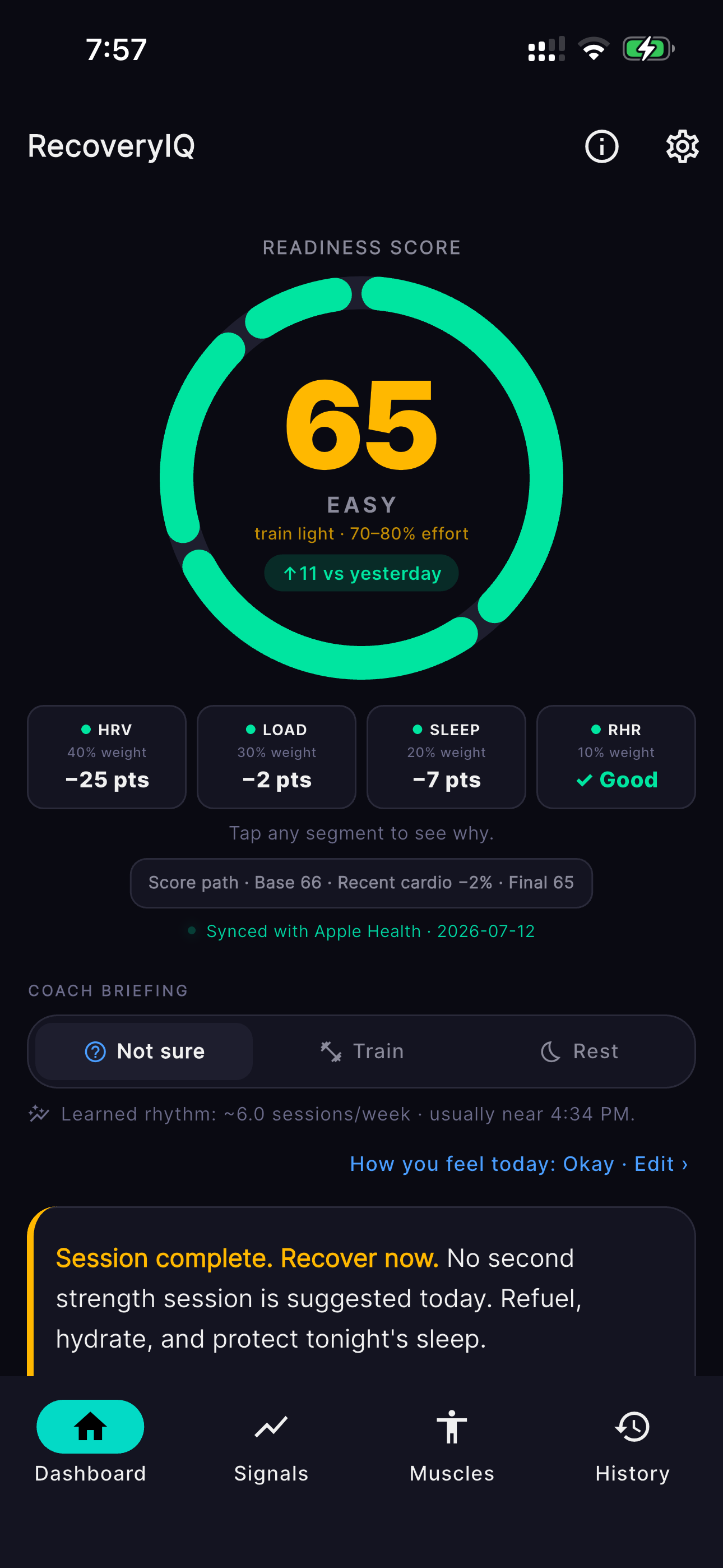
RecoveryIQ main dashboard showing readiness score and biometric signals
Step 1

Morning Check-In

Start your day with a clear picture of your recovery status. Your readiness score is calculated automatically while you sleep, pulling HRV, RHR, and sleep data from Apple Health in the background — and in v2.2.0, tapping the score shows the full breakdown of exactly why.

  • Readiness score calculated automatically while you sleep
  • HRV, RHR, and sleep data synced from Apple Health
  • Tap the score for a full breakdown: points per signal, plus active SpO2/respiratory/temperature modifiers
  • No manual data entry required with Apple Watch
Step 2

Pre-Workout Review

Before you train, check the 3D Recovery Map to see which muscles are ready to work. Drag to rotate the figure, tap any of 18 muscle groups, and read the continuous fatigue-to-ready spectrum to make informed decisions about your workout.

  • Rotate the 3D figure — front, back, and quarter views
  • Continuous fatigue-to-ready color spectrum (not just a few fixed colors)
  • Tap any muscle for recovery percentage, ETA, and exercises to avoid or favor
  • Muscles without enough data show an honest "Learning" state, never a false 100%
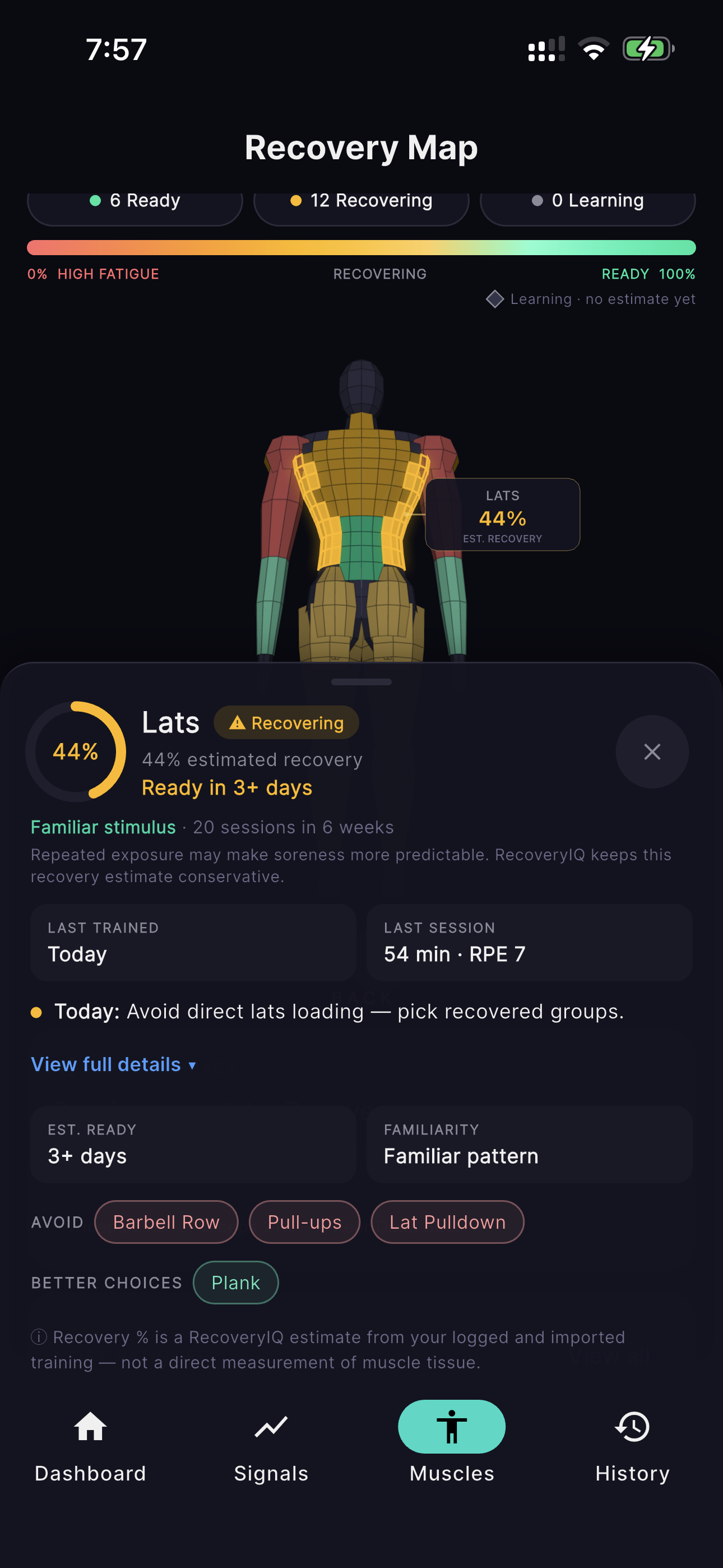
RecoveryIQ 3D Recovery Map showing muscle-specific recovery percentages and details
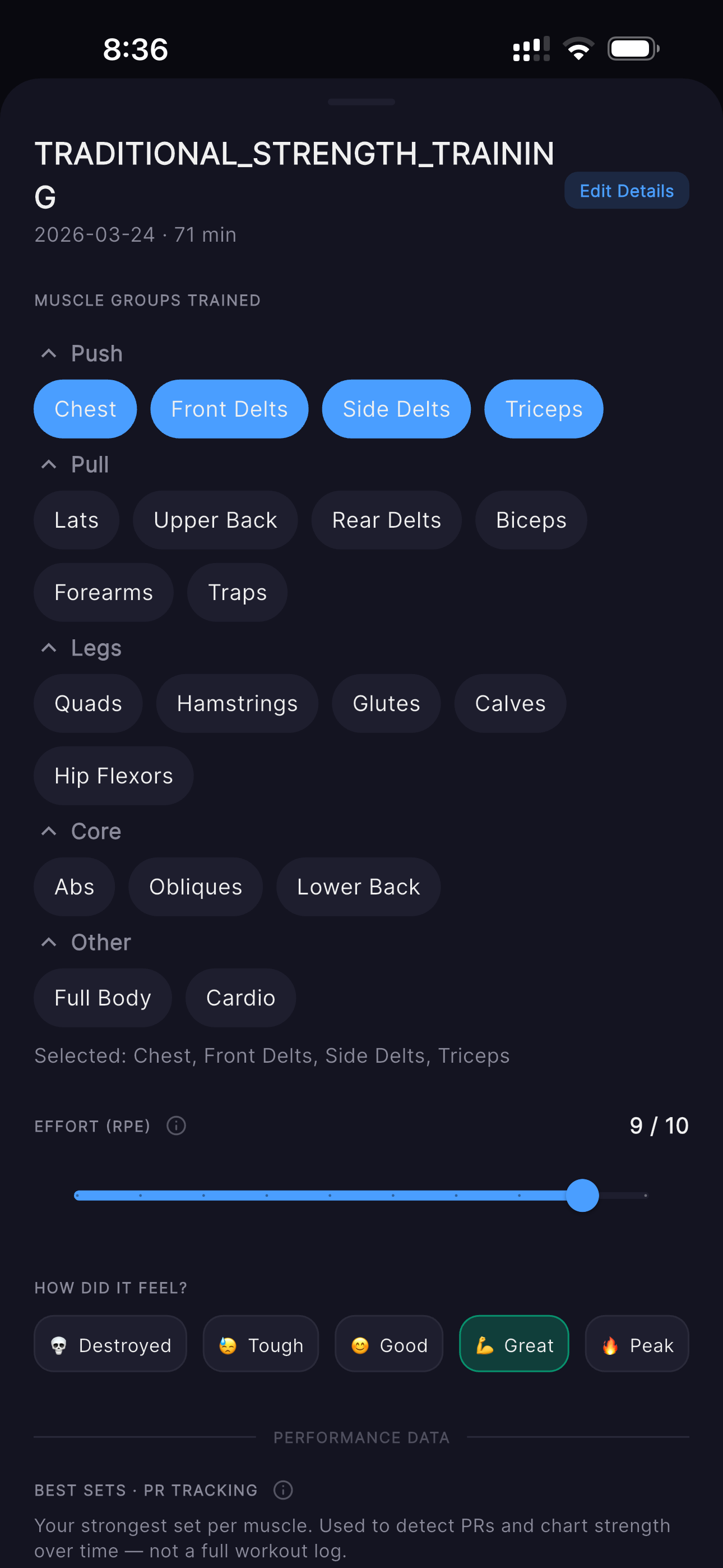
RecoveryIQ workout enrichment form with muscle group selection and RPE input
Step 3

Post-Workout Enrichment

After your workout, add the context that drives your recovery tracking. Apple Watch captures the basics automatically, but you tell RecoveryIQ which muscles you trained and how hard you pushed.

  • Apple Watch captures duration and heart rate automatically
  • Add muscle groups and RPE after your session
  • Drives the Recovery Map and DOMS calculations
  • Works with manual workout logs too (no Watch required)

Key Concepts

Understanding these core ideas will help you get the most out of RecoveryIQ.

Watch Enrichment

Apple Watch knows when you worked out and how hard your heart worked, but not which muscles you trained. RecoveryIQ bridges this gap by letting you add muscle groups and RPE after the fact.

Why it matters This enriched data drives the muscle-specific recovery calculations that power your Recovery Map.

Recovery Map Science

The Recovery Map — rebuilt in 3D for v2.2.0 — tracks 18 individual muscle groups using a science-backed DOMS decay model. Larger muscles (quads, lats) take longer to recover than smaller ones (biceps, calves). Recovery slows when your global readiness is low, and cardio activities like cycling or swimming now add a light, activity-specific muscle load on top of their systemic fatigue.

Science-backed approach Our recovery model is built on peer-reviewed research in exercise physiology and DOMS progression, adapted to your personal biometric data.

30-Day Calibration

RecoveryIQ compares you to yourself, not population averages. It needs 30 days of consistent Apple Watch sleep data to establish your personal HRV and RHR baseline. You'll get scores from day one, but they become most accurate after calibration.

Confidence progression Your scores gain confidence over the 30-day period as RecoveryIQ learns your unique patterns and establishes your personal baseline.
Calibration Timeline 30 Days
Day 1
Initial
Day 15
Learning
Day 30
Calibrated

Manual vs Watch Workflow

Apple Watch is recommended but not required. You can log workouts and biometric data manually if you don't have a Watch. The Recovery Map and DOMS tracking work with both workflows.

Feature With Apple Watch Manual Entry
Biometric Data Automatic sync Manual input
Workout Detection Automatic Manual log
Confidence Level Full Reduced*
Recovery Map
ACWR Tracking
*About the confidence penalty Manual entries receive a confidence penalty because they lack the precision of Watch-captured data. However, these entries are automatically upgraded when Watch data becomes available, so you never lose your workout history.

Ready to train smarter?

Download RecoveryIQ and start building your personal baseline today.